Every family has its rules: the divorced parents who should not share a table, the kids who need to be near their parents, the grandmother who cannot sit next to the speakers. With AI seating you write those rules in plain words, and the whole room is arranged for you in seconds.
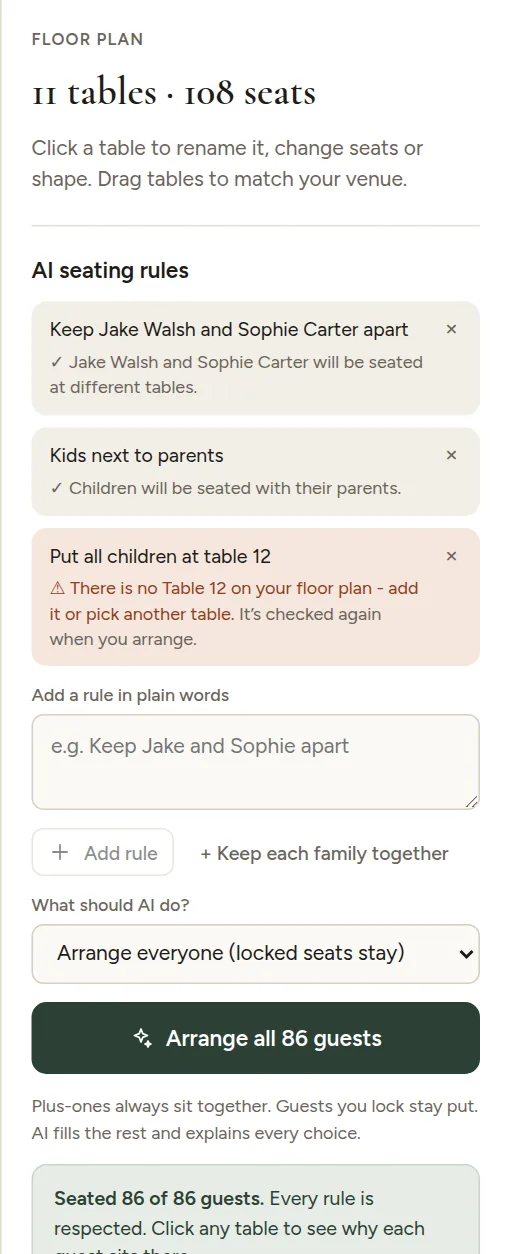
Add rules
- Open the Floor plan tab.
- In AI seating rules on the right, type a rule and press Enter (or click Add rule).
- Add as many rules as you need, one idea per rule.
You can use first names, full names, family names ("the Morgans") or group names ("University friends"), and you can write in English or your own language. Common rules are one click away: Kids next to parents and Keep each family together.
Arrange
Choose what the AI should do and click the arrange button. See Arrange everyone or only the unseated guests.
Some things always hold, with or without rules:
- couples and plus-ones sit together,
- locked guests stay where they are,
- no table gets more guests than it has seats.
Check the result
Under each rule you see how it was understood, for example "Jake Walsh and Sophie Carter will be seated at different tables". After arranging, every guest in the table panel shows why they sit there.
AI is very good at this, but it can misread an unusual rule, so always look over the result before you print. You can move anyone by hand afterwards.
AI seating is part of the print pack. You can write your rules before you unlock it: they are read the first time you arrange.
Next: rule examples that work well.