seatings is an online wedding seating chart maker. You bring your guest list, arrange everyone at tables on a floor plan of your venue, and download print-ready files for the day: a seating chart poster, escort cards, place cards, table numbers, a menu and a welcome sign. Everything is made from the same plan, so names and tables always match.
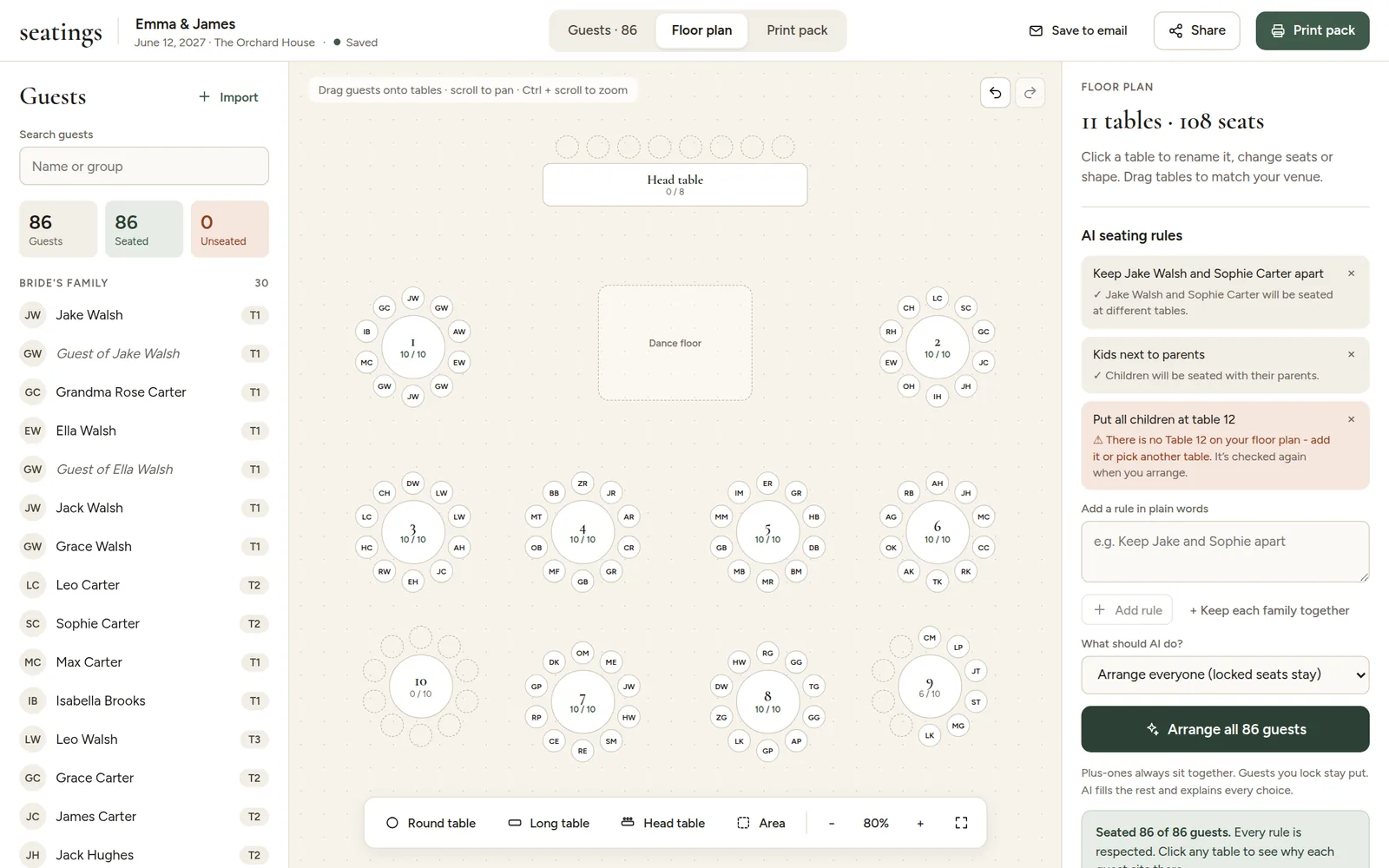
How it works in four steps
- Start a plan with your names. No account and no card needed. See Create your first seating plan.
- Bring in your guests by pasting a list, uploading a CSV or Excel file, or linking a Google Sheet. See Import your guest list.
- Seat everyone. Drag guests onto tables yourself, or write family rules in plain words ("Keep Jake and Sophie apart") and let AI seating do it.
- Print. Pick a look, check every piece on screen and download PDFs for your home printer or a print shop. See The print pack.
What is free and what is paid
Planning is free with no time limit: the guest list, the floor plan, seating by hand, sharing and previewing every printed piece. A one-time payment of $19 per seating plan unlocks AI seating and the downloads. There is no subscription. See Payments and refunds.
Who it is for
Couples planning their own wedding, and the parents, planners and venues helping them. It works just as well for rehearsal dinners, anniversaries, galas and any seated event, as long as the guests need a seat and a name card.
Everything you change saves on its own. Save your plan to your email so you can open it on any device.